
Window Peeper - Get Caught Eating a Burger at the Window
You're eating a burger by the window when you notice someone watching from outside. You look straight at them, scowl, put your burger down, and get up to close the curtain. The viral Window Peeper trend, starring you.
- You add1 photo
- You get15s vertical video
- Pricefrom 612 credits
#WindowPeeper#WindowPeeperAI#BurgerWindowTrend#WindowPeeperFilter#AIZoomTrend#WindowPeek#FunnyAIVideo
Upload Your Photo
One clear photo of one person, with the face fully in view and nothing covering it.
Generation cost612 Credits
Add your photo to continue
Overview
About the Window Peeper - Get Caught Eating a Burger at the Window template
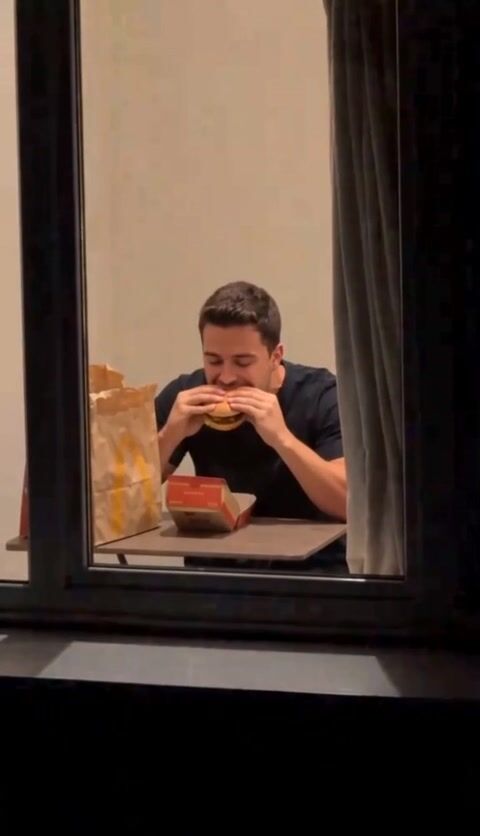
The Window Peeper video begins across from a dark building. The camera slowly zooms toward one illuminated window, where you're sitting at a table with a fast-food burger held in both hands. You lift it toward your mouth, take a bite, then lower your gaze as you chew.
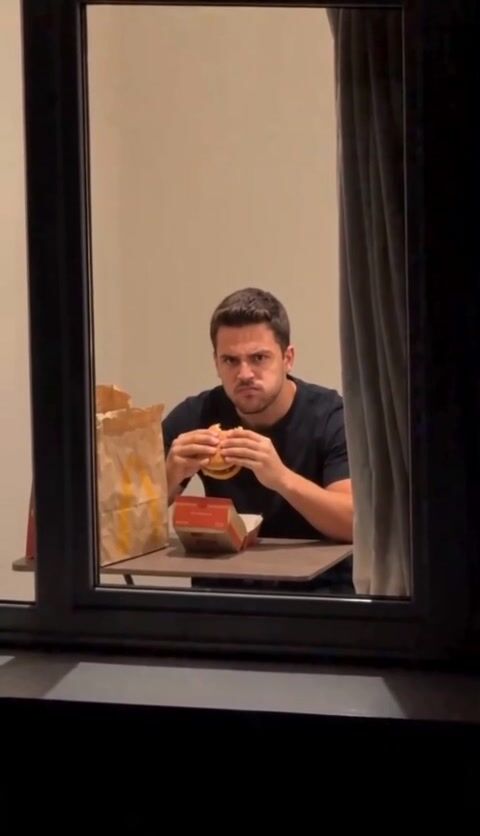
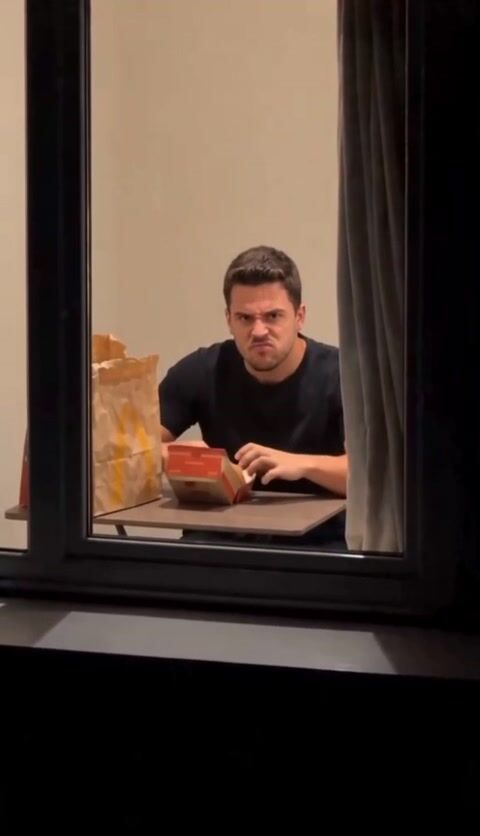
But the person watching from outside isn't as unnoticed as they think. You look up directly at the camera, still chewing, then scowl and wrinkle your nose as if you've caught someone spying on your dinner.
The funny part is how seriously you react to something so ordinary. You put the burger down, stand up, move toward the curtain at the right, grab its edge, and glare one last time. Then you pull it across the window, completely blocking the view.
- Video length
- 15 seconds
- Photos you add
- 1 photo
- Price
- 612 credits
- Format
- Vertical 9:16
- Category
- Funny
Guide
How to make the Window Peeper - Get Caught Eating a Burger at the Window video
- 1
Add Photo 1 to appear as the person sitting behind the window, eating a burger and confronting the watcher.
- 2
Choose 480p or 720p for your burger-window video.
- 3
Confirm that Photo 1 may be used to create your video.
- 4
Press Generate video, wait for your Window Peeper scene, then watch and download the result.
Each photo: One clear photo of one person, with the face fully in view and nothing covering it.
Get a better result
Photo tips, and what can go wrong
Photo tips
- For Photo 1, choose a portrait showing your upper body, since you begin seated with a burger held in both hands.
- A direct gaze in Photo 1 suits the moment when you look up from chewing and stare toward the camera.
- A neutral or serious expression in Photo 1 suits the suspicious scowl before you close the curtain.
- Photo 1 with visible shoulders and some upper torso suits the transition from sitting at the table to standing beside the curtain.
What can go wrong, and how to fix it
- The extreme zoom from the dark building to the illuminated window may make your appearance difficult to follow. Try another Photo 1 with more of your upper body visible.
- The curtain must completely cover the window at the ending. If the closure looks incomplete, generate another result and check whether the final view is fully blocked.
Background
Where the Window Peeper - Get Caught Eating a Burger at the Window trend comes from
The Window Peeper trend is a short suspense-comedy video built around an awkward moment: someone is secretly watching a person through their apartment window, but the person inside suddenly notices and shuts them out.
The format became popular through AI effects and reusable video templates circulating on TikTok in October 2026. Trend tracking recorded multiple Window Peeper posts and related remakes around October 20–22, including videos tagged #windowpeeper, #capcutpioneer, and #aizoomtrend.
The opening creates the feeling of a mysterious late-night observation. A dark building fills the view, with one brightly illuminated window attracting attention. As the camera moves closer, the audience discovers someone sitting at a table, casually eating a burger.
That's when the joke begins. Instead of continuing to eat without noticing the camera, the person inside suddenly looks toward the viewer. The burger stays in their hands while they chew and stare. Their expression grows increasingly annoyed, turning an ordinary dinner into an uncomfortable confrontation.
The ending completes the joke. The person puts the burger down, gets up, and closes the curtain, cutting off the camera's view. The audience goes from watching someone else's private moment to being treated like an unwelcome visitor.
Part of the format's appeal is the contrast between its dramatic presentation and its ridiculous subject. The distant nighttime zoom feels like the beginning of a suspense film, yet the big reveal is simply someone eating fast food. The suspicious glare and abrupt curtain closure make the situation even funnier.
The trend also appeared with recognizable faces and characters. One widely circulated version featured Mr. Bean, while related burger-window edits used footballer Cole Palmer. These variations helped demonstrate how the same window scene could become a different joke depending on who appeared behind the glass.
Remakes generally preserve the main sequence: the distant window, the burger, the moment of recognition, and the curtain being pulled closed. Changing the person at the table changes the humor without losing the familiar ending.
This template puts you behind the illuminated window, eating the burger, confronting the watcher, and finally closing the curtain.
Questions
Frequently asked questions
What is the Window Peeper AI trend?
The Window Peeper trend shows someone eating a burger inside an illuminated apartment window while a camera zooms in from across a dark building. The person notices the camera, gives it an annoyed glare, puts the burger down, and closes the curtain. The joke is that the supposed secret observer gets caught watching.
How do I make the Window Peeper AI video?
Add Photo 1 so you become the person eating the burger behind the window. Choose either 480p or 720p, confirm permission to use the photo, and press Generate video. Your result follows the burger-eating sequence, including the suspicious stare, standing up, and pulling the curtain shut.
How many photos do I need for the Window Peeper effect?
You need one photo. Photo 1 represents the person sitting at the table with a burger, looking toward the camera and eventually closing the curtain. A portrait that includes your upper body works well for the seated eating moment, while a face directed toward the camera suits the later glare.
Where did the Window Peeper trend come from?
The Window Peeper format spread through short AI-effect videos and reusable templates on TikTok around October 2026. Posts featuring the burger-window scene circulated alongside character variations, including a widely shared Mr. Bean version. The central joke remains the same: someone eating behind a window notices the person secretly watching and closes the curtain.
What is the Window Peeper burger window trend?
It's the video format sometimes described as "Get Caught Eating a Burger at the Window." The camera approaches an illuminated window from outside while someone inside eats a fast-food burger. After noticing the watcher, the person scowls, lowers the burger, stands up, and pulls the curtain closed. The unexpected confrontation is the punchline.
What sound does the Window Peeper video use?
The generated Window Peeper video carries the original video's own sound. The action itself is easy to follow visually: the long approach toward the window, the burger bite, the suspicious look, and the final curtain closure tell the story without needing an explanation from the person inside.
Why does the Window Peeper filter show someone eating a burger?
The burger makes the mysterious window scene unexpectedly ordinary. The camera approaches as though something dramatic is happening, only to reveal someone having a meal. The humor builds when that person notices the attention, becomes visibly irritated, and shuts the curtain as if the viewer has crossed a boundary.
Why does my Window Peeper video look different during the zoom?
The scene includes an extreme digital zoom from an entire building facade to a close view of one window. That large change in scale is a demanding part of the sequence. If the person becomes difficult to recognize during the approach, try a different Photo 1 that shows more of your upper body and face.
Questions about credits, how long a video takes, your photos or downloads? See the Help page.
Window Peeper - Get Caught Eating a Burger at the Window reviews
No reviews yet. Reviews come only from people who made a video with this template.
Ready to make your Window Peeper - Get Caught Eating a Burger at the Window video?
Upload your photosLast updated: